Amazon KINDLE 2ND GENERATION Manuale Utente Pagina 6

  • Scaricare
  • Aggiungi ai miei manuali
  • Stampa
  • Pagina
    / 8
  • Indice
  • SEGNALIBRI
  • Valutato. / 5. Basato su recensioni clienti
Vedere la pagina 5
© 2015 Amazon.com, Inc. or its affiliates. All rights reserved.
2. Click the Enter a new address button.
3. Enter the address information and click the Save & Continue button.
4. Select the “Click here to make this your 1-Click default address” link.
Entering Amazon.com Gift Card claim codes
You must first enter your gift card claim code into Your Account so the balance is available for use. The
funds will then be applied automatically to your next purchase, including digital items.
To add a gift card balance to Your Account:
1. Visit the Your Account page.
2. In the Payment section under Gift Cards, click "Apply a Gift Certificate/Card to Your Account."
3. If prompted, sign in with your e-mail address and password.
4. Enter your claim code and click "Apply to Your Account."
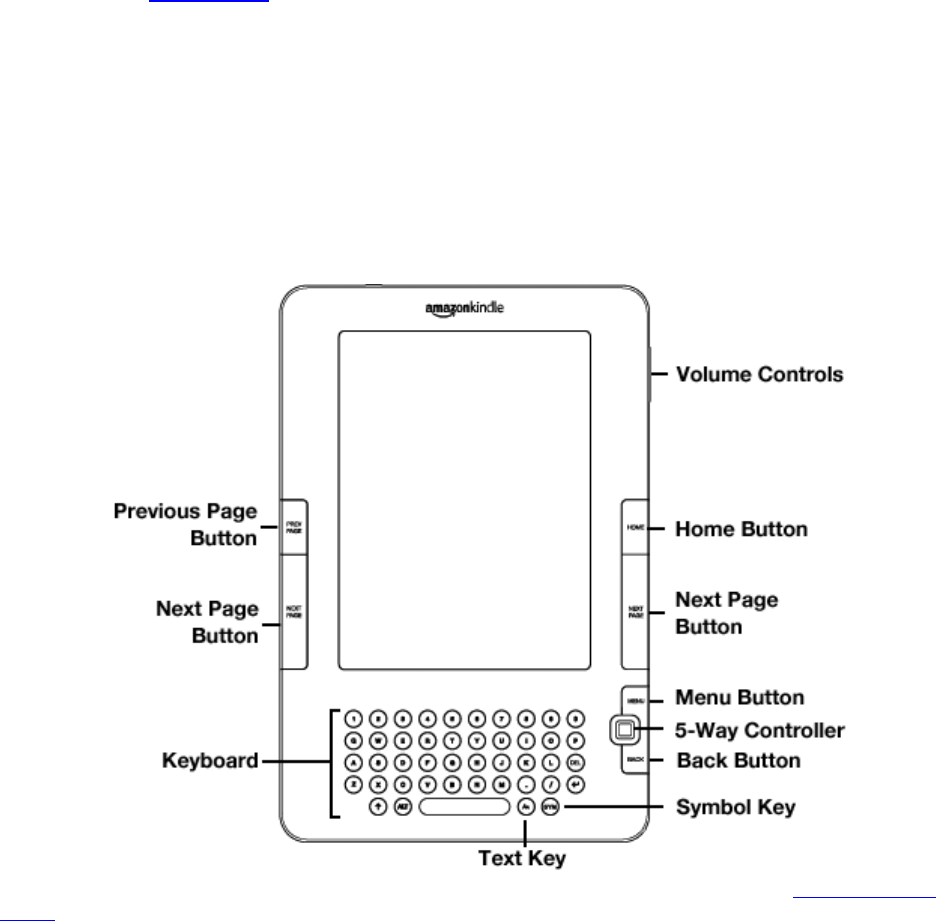
Using the Controls
To get around on your Kindle, you use the buttons, menus, and the keyboard-all of which are explained
here.
All of the information you'll need about getting around on your Kindle can be found on the Navigating Your
Kindle Help page.
Vedere la pagina 5
1 2 3 4 5 6 7 8

Commenti su questo manuale

Nessun commento