Amazon KINDLE 2ND GENERATION Manuale Utente Pagina 7

  • Scaricare
  • Aggiungi ai miei manuali
  • Stampa
  • Pagina
    / 8
  • Indice
  • SEGNALIBRI
  • Valutato. / 5. Basato su recensioni clienti
Vedere la pagina 6
© 2015 Amazon.com, Inc. or its affiliates. All rights reserved.
Using the Home Screen
Your Home screen displays a list of all of your Kindle reading materialsbooks, newspapers, magazines,
blogs, personal documents, as well as audiobooks. It serves as a personal bookshelf for all of your
reading material, as well as a starting point to access other Kindle features.
To display the Home screen: Press the Home button on the right edge of your Kindle.
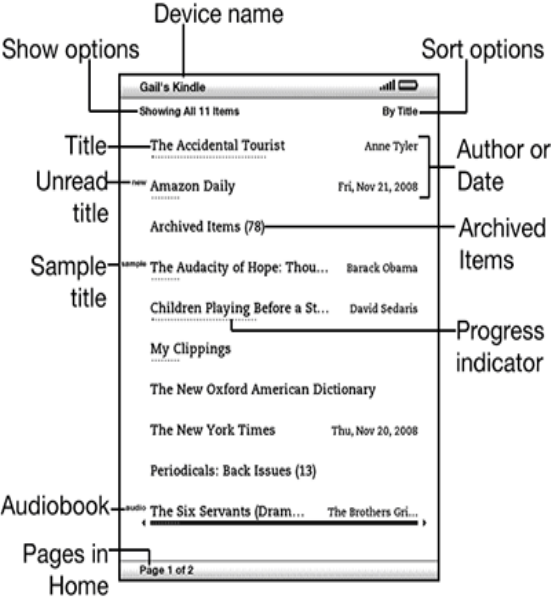
Here's what you'll see on the Home screen:
Device name: The name of your Kindle. You can edit this name on the Settings screen.
Show options: Choose which types of content you want displayed in Home.
Sort options: Choose the order you want content displayed in Home.
Title: the title of the item.
Author or Date: For books, the author of the item is listed. For periodicals and blogs, the date is
listed.
Unread title: The "new" label indicates the item has never been opened and is less than 24
hours old. Once you open a new document or more than 24 hours has passed since the item
arrived on your Kindle, the "new" label is removed.
Archived Items: Downloadable items stored at Amazon.com not currently on your device.
Sample title: Indicates the book is a sample. If you like it, you can purchase the full book when
viewing the sample.
Progress indicator: The series of dots below the item shows how long the book is and bold dots
show how far you have read in a particular item.
Audiobook title: the "audio" label indicates the book is an audiobook.
Pages in Home: Indicates the total number of pages in Home. Use the Next Page or Previous
Page button to navigate the pages.
Vedere la pagina 6
1 2 3 4 5 6 7 8

Commenti su questo manuale

Nessun commento